Thursday, December 15, 2011

Dynamic Lighting - Moody Flowers

Short - Sweet - To the Point! :)

Dynamic Lighting is lighting where there is ONE definitive, bold, light source that creates an uneven lighting contrast of bright brights and dark shadows...
this isn't the harshest of lighting conditions, but it still emphasizes detail in the flower as well as in the cloth

a little harsher?

window as dynamic light source
 the main light source for the first picture was the window, the rest of the room was dark for the most part even though there were other light sources (windows). The flower is a little lower than the window. (light source)

The light source for the second picture was the same window, though the position was much farther away from the window. The flower is level with the window...

of course the lighting doesn't always have to be 90 degree angles... The light source (sun) is almost directly facing the camera, revealing detail on the window and wood, that would not otherwise be visible had there been other light sources present (say on the other side of the window...) ...or had there been a bottle of windex nearby... 

Below is a great tutorial on how to do FAKE Dynamic lighting with some editing...

http://psd.tutsplus.com/tutorials/photo-effects-tutorials/add-dynamic-lighting-to-a-flat-photograph/

Graduated Neutral Density Filter

Graduated Neutral Density Filters are pieces of plastic, one end it perfectly clear, the other end is darker to prevent some light from entering...

 When the camera is pointed at an unevenly exposed area (horizon) The Filter can be used to properly expose BOTH the sky and the land.
This is without the filter, (not that there's anything wrong with this picture) It just might not be the look you're going for....
same picture, WITH the filter... (the down side is objects in the foreground get darker)

The advantage to using the filter is its really easy to get that HDR look without taking multiple pictures. (it also works great for videos) 


...and of course... There's always Set Extension to get a FAKE background instead... 


The images below has nothing to do with satanic cult worshiping...  

This is a sample form an upcoming film I'm working on... and DON'T WORRY, it doesn't have anything to do with "evil" stuff... 

Tuesday, December 6, 2011

DSLR Sensor Cleaning (Lazy Guide) "Hot Pixel"

in the spirit of lazy this blog post will be very lazily done*


To clean your DSLR sensor WITHOUT touching, risking or damaging your sensor:
*don't take off your camera lens*

1: Set your camera to Manual Mode

2: Go to the options (middle yellow wrench thingy on Canon DSLR's)

3: Select "Sensor Cleaning" (your camera will open it's sensor where you could if you wanted to, put a sensor cleaning device inside and clean it, however if you screw up, you may potentially render the camera completely useless... )

4: after about a minute to 2 minutes turn your camera off

5: Take a blank picture and check it for hot pixels and other dirt... if the picture looks cleaner then your sensor is clean and there is no need to take it to a camera specialist.

this is a picture taken with the lens cap on... LOOKS perfectly black right?


this is the EXACT same picture as the one above, only slightly zoomed in to reveal that even though the picture looks black, there's still plenty of dirt and dust and all sorts of imperfections on the sensor... (just proves how incredibly sharp and sophisticated camera's these days are)

and that one bright white dot in the center is called a "hot pixel" usually hot pixels aren't a problem and are virtually invisible unless you shoot in low light... where they can often become distracting and frustrating... They can always be colored over but if you shoot video, its a little harder to cover it up...

This picture below is the exact same zoomed in selection as the above picture, only taken AFTER I did the above procedure to clean my sensor... notice the hot pixel has vanished :)

there is still a little bit of dots and noise... but that can't be helped, and after a little touching up all that stuff can be fixed up! (only a truly picky photographer would gripe about something so small as a little bit of noise)

Incredible above pictures taken by Andrew Taraba, please no stealing?

Monday, November 28, 2011

Light Rays Tutorial


Cheap and easy way to add light rays to any photograph in almost ANY photo-editor
(also works for video) 


STEP 1: Create basic shape for the light ray
beautiful.... 
STEP 2: Motion Blur

I see a face...
STEP 3: Layer it 
adding multiple copies of the same ray over and over in different spots of the picture to get a nice look... (change the blending mode to "add" so make the black go away...) 

this is a darker look to emphasize the rays

more washed out

Without the picture below this is what my rays ended up looking like...

I added brighter spots at the bottom to make the light more believable and added some dust particles to give a more dreamy, fantasy look... 


I did not take this picture... 


I think one of the most important parts of adding anything to a photography, is simply, matching the color... 

Friday, November 25, 2011

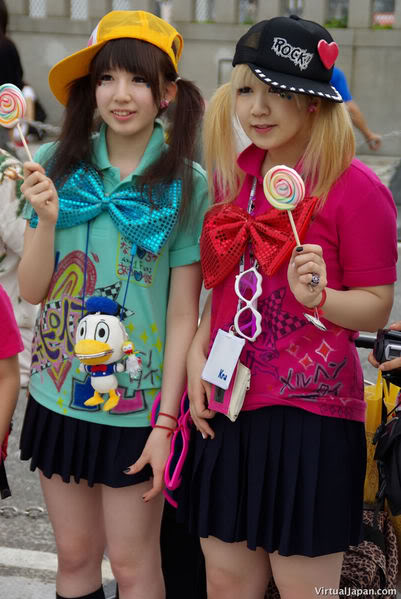
Harajuku - Fashion, Beauty Besides the Skin...

Every Sunday in the area around Harajuku Station, hundreds, thousands of teenagers flock to the area...  wearing the most outlandish, awesome, crazy fashion you can think of... and also to socialize among themselves and meet new people... Being there in person... It's another story... 


The styles vary anywhere from goth, Visual Kei,  cosplay, decora, punk and many made up and mixed styles... 


contest being held at Harajuku 
:)


Many fashion styles around the word originated from Harajuku and several countries around the world have also started having fashion meetups much like Harajuku. 


Its just a for fun thing... and also another reason why getting off the computer and going out into the real world is so much more satisfying... And another reason why Japan is a step ahead of the world... 

Tuesday, November 22, 2011

HSL Magic! The Magic of adjusting Hue, Saturation and Lighting...

Using HSL in any photography editing program and even video editing programs, you can go from the original left photograph, to the new HSL enhanced right photograph with almost no work at all... 
feel free to copy and past the photo below, if you want to follow along with this tutorial

STEP 1:  Do all the "usual" adjustments, from the original photograph and pretty it up the way you think looks best... I usually do a brightness and Contrast adjustment with a few Color Curves to get what I thought looked pretty nice:  


Step 2: HSL adjust... 


Experimentation is the best way photographers will learn... 

THE FINISHED PRODUCT: 

Here's some other photographs edited using HSL adjustments.

Pictures by Andrew Taraba

Monday, November 21, 2011

Incredible Canon T3i/600D Example Pictures

Incredible Canon T3i/600D Example Pictures

The Canon t3i is an incredible camera both for video and photography. I fell in love with this thing since the first time I touched it. Here are some photographs I took using only the Standard 18-55mm kit lens.
All the stars are smoking cigs... or maybe... All the cigs send us to the stars....
Time to make dinner... Someone forgot to clean out the oven... House instantly got filled with smoke... PICTURE TIME!!! ;]


Nothing turns a stomach or moves my hunger more than a nice old Live Sea Urchin...


Two satellites floating in the sky...


This was my picture for the Animal Photography Contest... I later found out that the magazine article I found the add for the contest in was three months old...
Symbolism in the cymbal....


Pictures by Andrew Taraba